This page explains how to use NicknameGenerator.net: open the page that matches what you need, enter or pick your input, then copy, read or print the result. A result looks wrong or a page does not load? Report it on the contact page.
By NicknameGenerator.net Editorial Team · Updated November 13, 2026
Find the Page You Need
Start on the home page; the menu and the lists there lead to nicknames for names, Discord display names, darker moods. Each page covers one kind of nickname or display name, built around a short tool or a list grouped by theme.
What Each Page Does
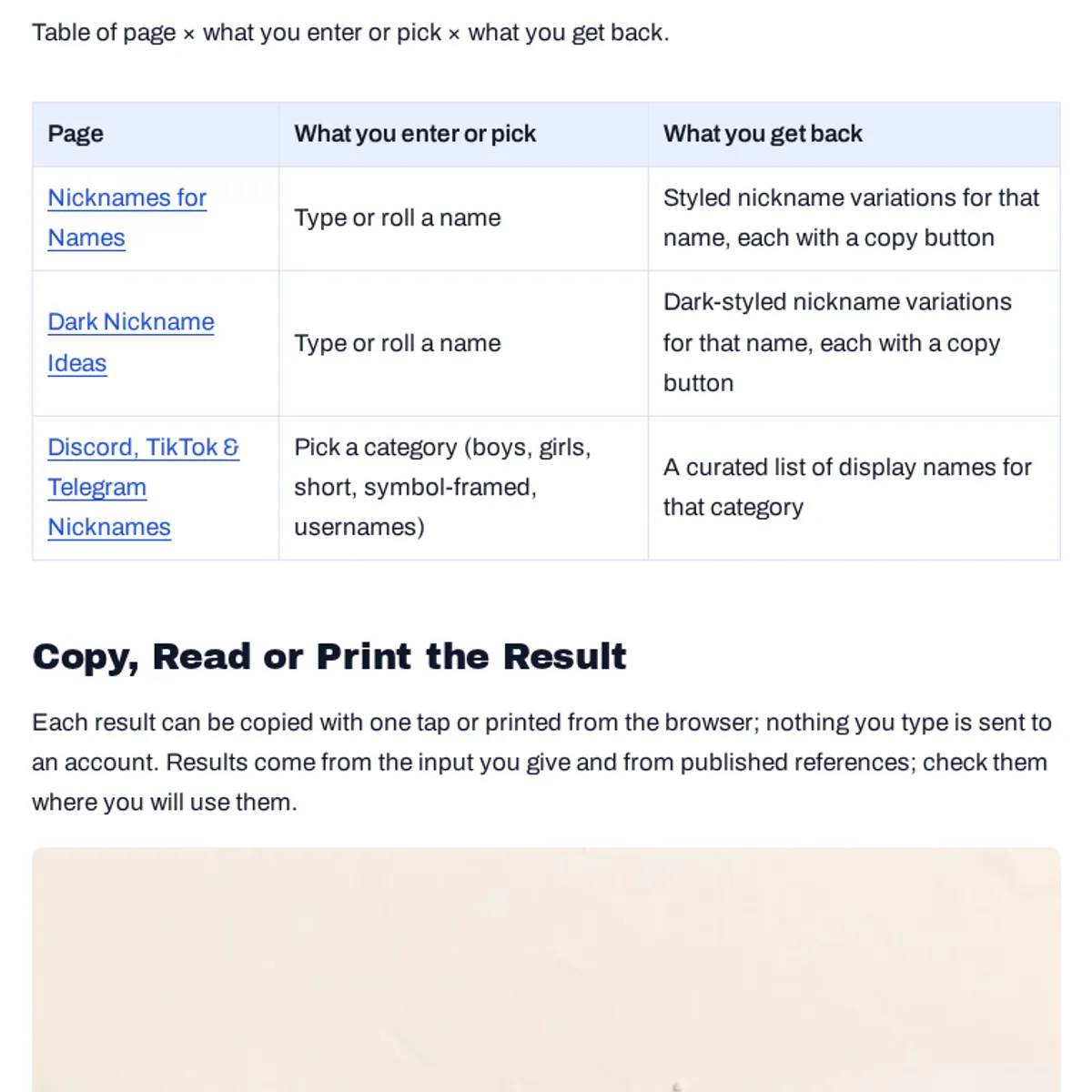
Table of page × what you enter or pick × what you get back.
| Page | What you enter or pick | What you get back |
|---|---|---|
| Nicknames for Names | Type or roll a name | Styled nickname variations for that name, each with a copy button |
| Dark Nickname Ideas | Type or roll a name | Dark-styled nickname variations for that name, each with a copy button |
| Discord, TikTok & Telegram Nicknames | Pick a category (boys, girls, short, symbol-framed, usernames) | A curated list of display names for that category |
Copy, Read or Print the Result
Each result can be copied with one tap or printed from the browser; nothing you type is sent to an account. Results come from the input you give and from published references; check them where you will use them.

Was this page helpful?
One tap tells us what to improve.
Thanks for your feedback!